How to Create a Carousel on Instagram: Complete Guide 2025
📅 7/9/2025

Instagram carousels let you combine images and videos in a single post, boosting engagement and increasing the time users spend with your content. This guide explains how to create engaging carousels, strategies to optimize them, and practical tips to turn engagement into results for your e-commerce.
What is an Instagram carousel?
An Instagram carousel is a post that allows you to include multiple images or videos in one single upload, which users can swipe left to view in sequence.
- Personal accounts can include up to 10 items.
- Professional or creator accounts can add up to 20 items per post.
The carousel format is perfect for storytelling, showcasing products step by step, before-and-after comparisons, quick tutorials, or visual summaries of articles and guides. This makes carousels an ideal tool for creating immersive and dynamic experiences within Instagram.
💡 Practical example: a cosmetics shop could create a carousel showing each step of a skincare routine, with each slide highlighting a different product along with tips and benefits.
Benefits of Using Carousels on Instagram
Adding carousels to your digital marketing strategy offers multiple advantages:
- Higher engagement: carousels encourage swiping and exploring, driving more likes and comments.
- Increased time on post: users spend longer consuming your content, which the Instagram algorithm favors.
- Content versatility: you can mix images, videos, infographics, text, and storytelling.
- Better visibility: even if a user skips the first slide, Instagram may show them the following ones later.
- More comments and shares: studies show carousels generate more interactions than single photos or videos.
The sequential format lets you educate your audience, guide them through a purchase process, or inspire them with visual storytelling—making carousels an essential resource for branding and online sales strategies.
Steps to Create a Carousel on Instagram
Creating a carousel is simple, but it requires planning and strategy to make each slide compelling.
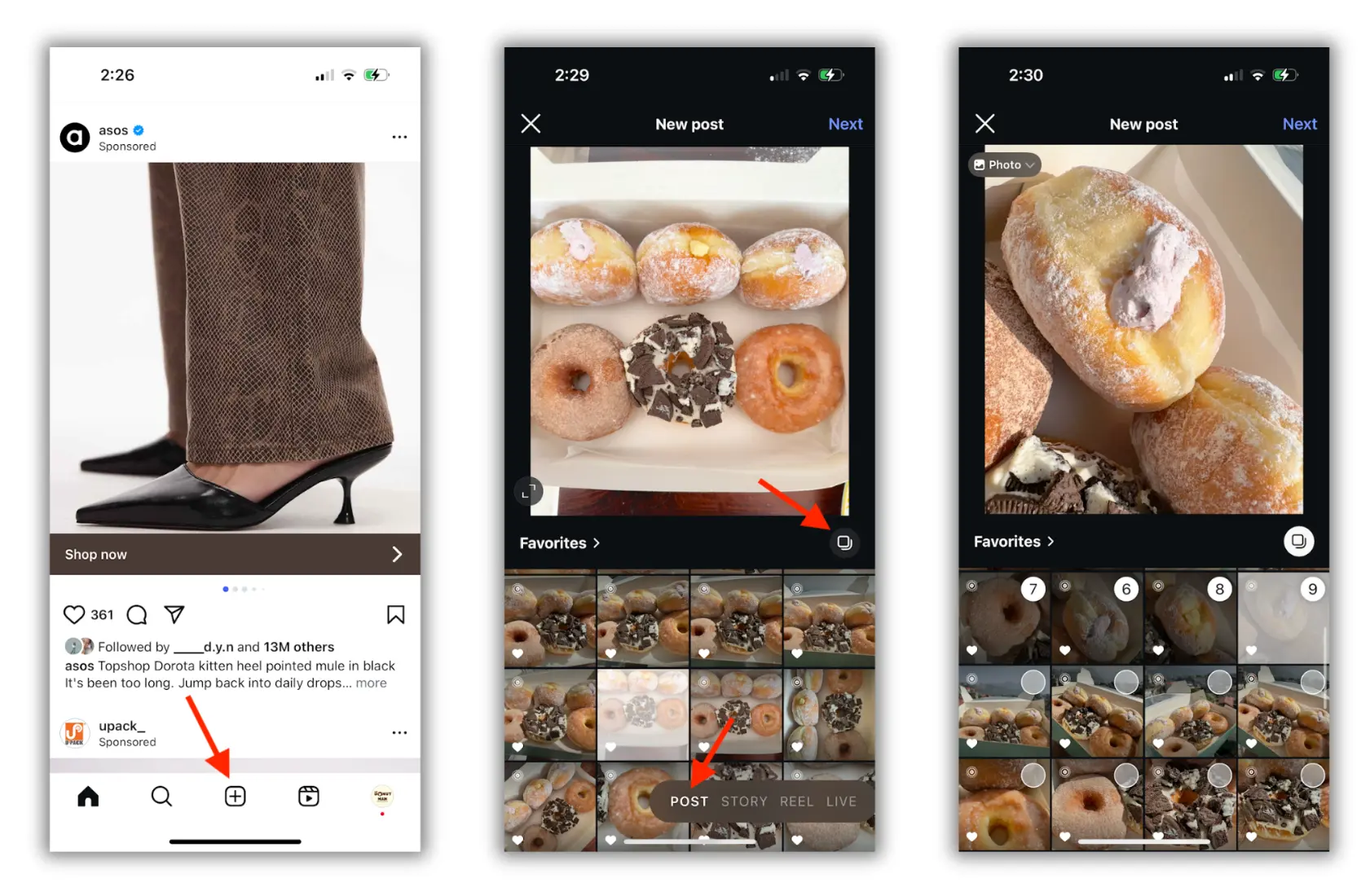
- Open Instagram and tap the + icon to create a new post.
- Select the multiple selection icon (several images).
- Choose up to 10 images or videos (20 for professional accounts).
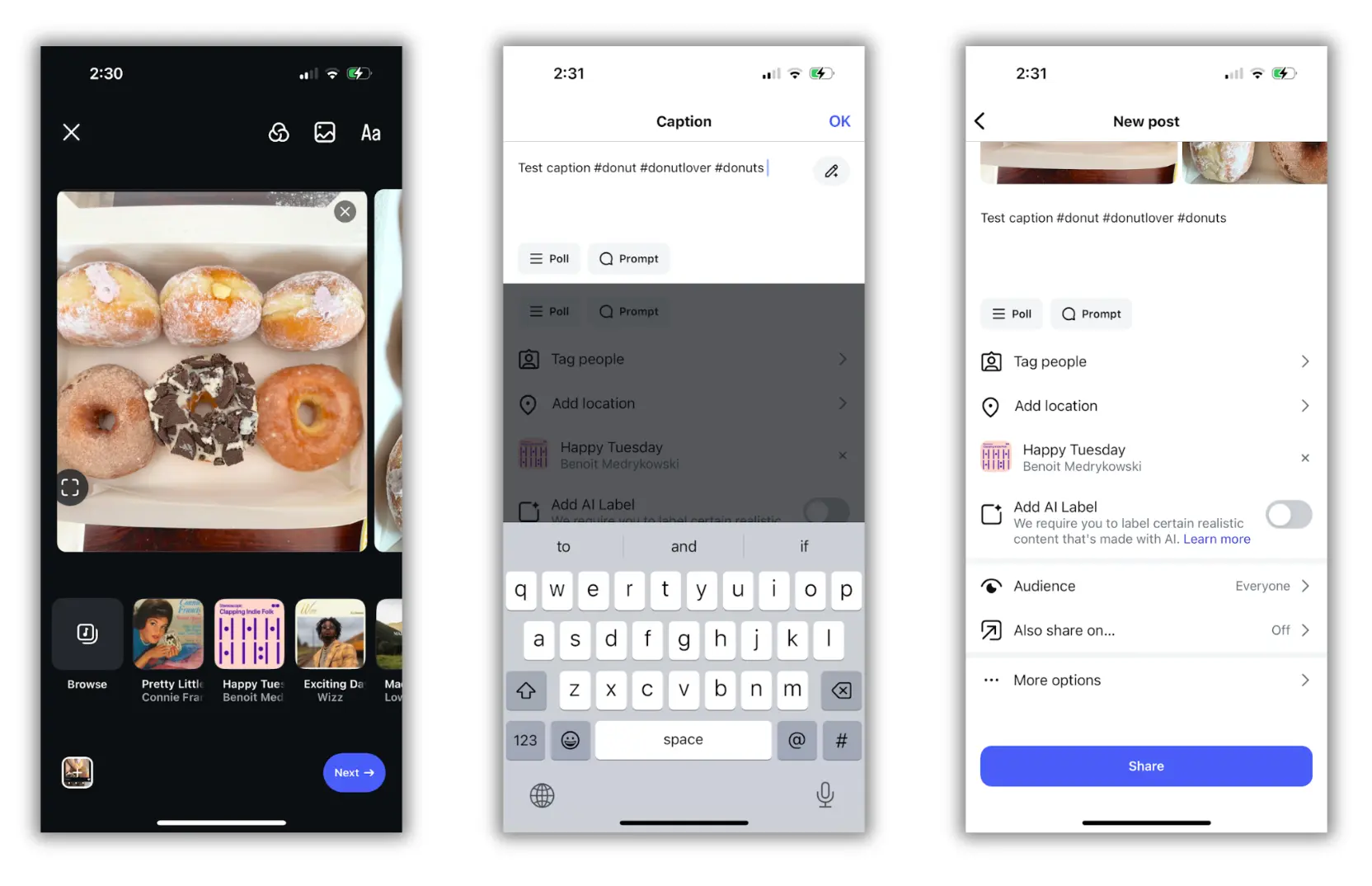
- Edit each image or video: apply filters, adjust brightness/contrast, and add text or stickers if needed.
- Write a strong caption that complements the visuals.
- Adjust options like location, tags, and hashtags.
- Tap Share to publish your carousel.
Pro tip: Before posting, make sure all images are visually consistent and tell a clear story, with each slide adding value and encouraging the user to swipe to the end.
How to Share a Carousel in Stories
To expand the reach of your carousel, share it in your Stories:
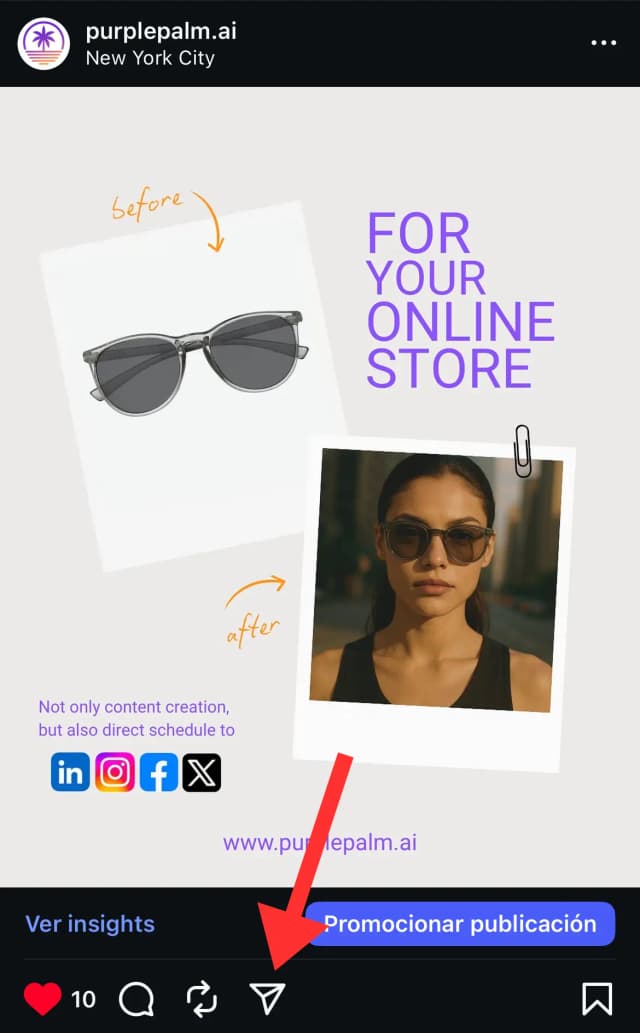
- Open the post you want to share.
- Tap the share icon (paper plane).
- Select Add to Story.
- Adjust size, position, and add stickers, GIFs, or text if you like.
- Publish the Story.
Tip: When sharing in Stories, add calls-to-action like ‘swipe to see the full carousel’ or ‘comment with your favorite slide’ to boost interaction.
Strategies for a Successful Carousel
Use High-Quality Images and Videos
High-quality visuals build credibility and professionalism. Avoid blurry photos or long unedited videos. Make sure images are well lit and videos are short (3–5 seconds per slide) to hold attention.
Create an Eye-Catching Cover
Your first slide should grab attention.
• Use bold, contrasting colors that pop in the feed.
• Add a clear and direct headline that sparks curiosity.
• Include dynamic visuals like icons, shadows, or illustrations.
Tell a Story
Organize your content sequentially to keep users engaged:
• Slide 1: Introduction of the topic.
• Slides 2–4: Key info or steps.
• Last slide: Conclusion and call to action (CTA). Using characters, real-life examples, or storytelling improves audience connection.
Include a Call to Action
Encourage interaction with simple, direct prompts:
• Save this post for later.
• Leave your thoughts in the comments.
• Share with someone who might need this info.
Maintain Visual Consistency
Stick to the same color palette, fonts, and graphic style across slides. If you use icons or illustrations, keep the style uniform. This strengthens your branding and builds trust.
Keep Text Short and Readable
Short phrases and bullet points make content easy to skim. Highlight keywords with bold text or different colors to guide the eye and make information more digestible.
Mix Up Your Content
Blend different types of content to keep things fresh:
• Text + image (inspirational quotes with photos).
• Infographics with data or stats.
• Mini step-by-step tutorials.
Optimize for Devices
Vertical format (1080 x 1350 px) takes up more screen space and is easier to read on mobile. If you go square (1080 x 1080 px), make sure text is big and legible across devices.
Use Relevant Hashtags
Mix popular and niche hashtags, but avoid overloading the post (aim for 10–15 max).
Track Your Results
Use Instagram Insights to check metrics like:
• Saves and shares.
• Comments and interactions.
• Carousel swipes.
Adjust your strategy based on results and test different content styles to see what resonates best with your audience.
Instagram carousels are a key strategic tool for brands, entrepreneurs, and content creators. They allow you to tell stories, showcase products, and increase audience engagement. To take your carousels and posts to the next level, you can rely on PurplePal, an AI-powered platform that creates and schedules content for e-commerce social media, helping you optimize posts, save time, and maximize results.